
Canada Revenue Agency
The page T3010 Annual Submission describes the process and importance of submitting your annual T3010 as well as a T1235 on time. It is important to note that submitting your T1235 does not update the list of owners and directors with your CRA account. Adding and updating your list of owners and directors with your CRA account is a separate process. The process of updating your church CRA account’s list of owners and directors is described below.
UPDATING RECORDS
Someone listed as a director/trustee on last year’s T1235 can submit a letter to the Charities Directorate to update the CRA list of records. This letter can be submitted through your church’s online My Business Account (preferred) or by mail. Note that the Charities Directorate no longer accepts communication by fax. If you need to call, the best time to call the Charities Directorate is first thing in the morning, 9am. For your reference, click on this CRA link to search for your local church records with the CRA website for the latest posted returns.
Here is a sample letter to Charities Directorate that you could use to request a change: Director Change Template.
ACCESSING THE BUSINESS ACCOUNT
To confirm an update, the director who has been given authorization (through the process above) should sign into their own personal CRA account as seen below. You should not create a separate login.
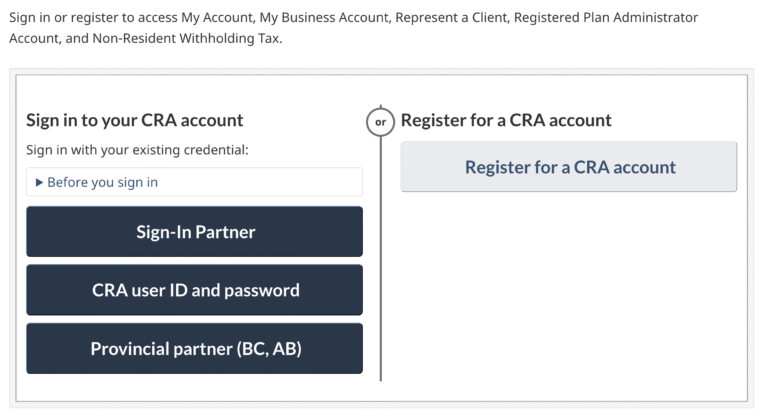
Once you have successfully logged in, you need to add the Business Account to your profile.
From the welcome page, Select Add account. You will get the following pop-up message.
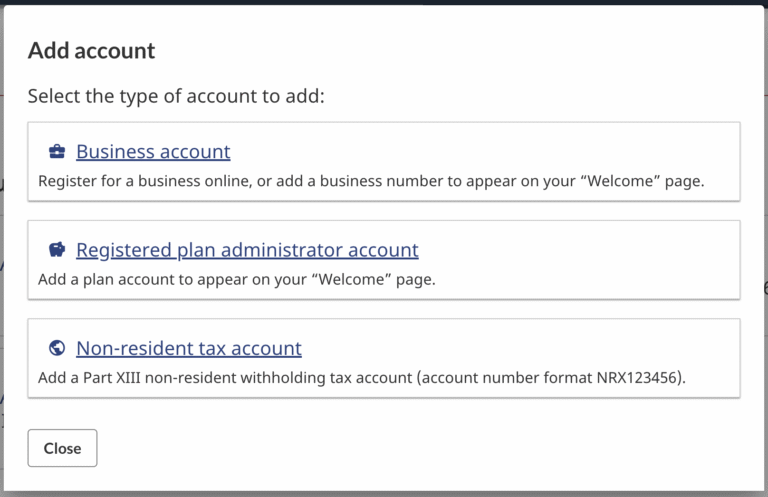
In the Add account window, select Business Account, and then select Add business number. Enter the church’s 9-digit BN and select Add.
After getting your confirmation, return to the welcome page and select your Business account to access charity-related services.
For more information on the registration process, see the CRA guide: Register to use online services for charities.
CONFIRMING AN UPDATE
Based on previous experience with this process, normally the CRA does not notify you when the process is complete and you have been added to the account. The best way to check if you have been successfully added is to follow the instructions above and see if you are able to add the church to your account. If you are not successful in adding the business account, try again in a few days.